数値の表示形式は、国によって違っています。
日本では「1,000.00」と3桁ごとの区切りは「,」で、小数点は「.」が一般的ですが、
これがまったく逆の国もあり、世界的の統一しようという話し合いがありましたが、
結局統一はされませんでした。
Palmマシンは環境設定で数値などの書式を設定できるので、
Palmwareが数値を表示するときは、設定された書式に合わせて表示します。
環境設定の設定値を取得する処理ですが、 PrefGetPreference関数(Palm OS 2.0以降)と LocGetNumberSeparators関数により区切り文字を取得します。
次にStrLocalizeNumber関数により、数値文字列の区切り文字を、
環境設定の書式に設定された文字に変換します。
この関数はあくまでも、区切り文字を変換してくれるだけで、
区切り文字の挿入をしてくれるものではありません。
サンプル画面
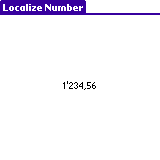
ヘッダファイル
#define MainForm 1000 #define MainLabel 1001 |
リソースファイル
FORM ID MainForm AT (0 0 160 160) NOFRAME BEGIN TITLE "Localize Number" LABEL "9,999.99" ID MainLabel AT (4 30) FONT 0 END |
イベントハンドラ
Boolean MainFormHandleEvent(
    EventPtr pEvent)    /* I:イベント */
{
    Boolean             handled = false;
    FormPtr             pForm;
    NumberFormatType    numFormat;
    Char                thousandSeparator;  /* 整数区切り文字(,) */
    Char                decimalSeparetor;   /* 小数点(.) */
    Char                buff[10];

    switch (pEvent->eType)
    {
    case frmOpenEvent:  /* フォームオープンイベント */
        /* 環境設定の書式取得 */
        numFormat = (NumberFormatType)PrefGetPreference(prefNumberFormat);
        LocGetNumberSeparators(numFormat, &thousandSeparator, &decimalSeparetor);

        StrCopy(buff, "1,234.56");

        /* 書式変換 */
        StrLocalizeNumber(buff, thousandSeparator, decimalSeparetor);

        /* ラベルに表示 */
        pForm = FrmGetActiveForm();
        FrmCopyLabel(pForm, MainLabel, buff);
        FrmDrawForm(pForm);
        handled = true;
        break;

    default:
        break;
    }

    return handled;
}
|
'06/2/15 新規作成
Copyright (c) 2006 kasa0 All rights reserved.